What a good sales tracker does
A notebook works until the pages run out. A spreadsheet works until a customer is waiting at the counter. A sales tracking app has to be quick enough to use during the sale and clear enough to read at closing time. For a small business that comes down to five things:
- Record a sale in seconds: the customer, the items and the price.
- Show the day's total without adding up by hand.
- Show profit, not only turnover.
- Keep your customers and what they still owe you.
- Keep stock up to date so you know what to reorder.
How Daily Sales Record tracks your sales
- Add your first product. Enter the products you sell, with their prices.
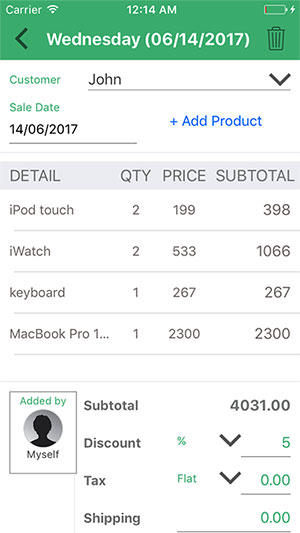
- Record a sale. Choose the customer and the products sold, with the price. You can add a discount, tax and shipping to the sale.
- See the result. Your totals and profit update, and the Archive keeps every past sale, so you can check any day by date.
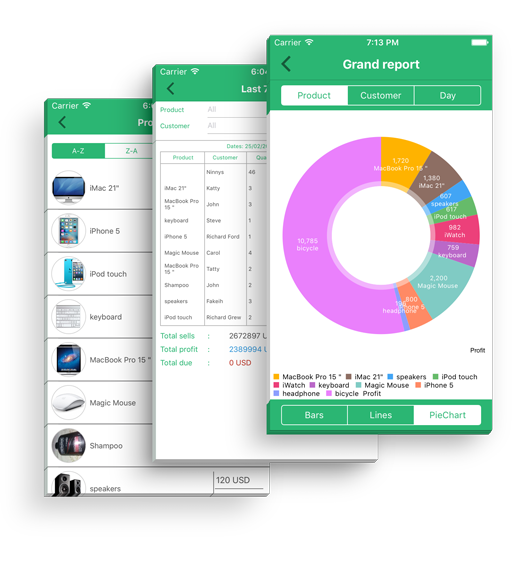
- Review your reports. Generate reports for a day, a week or a month, view them as bar, line or pie charts and export them to PDF. Exporting to Excel is part of Pro.
What you can track
- Sales: every sale by date, in the Archive.
- Customers and debts: contact details in one place, and who owes you.
- Products and stock: your products and inventory, with a notification when stock runs low.
- Invoices (Pro): create an invoice for a sale from a choice of templates and send it to your customer.
- Reports: daily, weekly and monthly, with charts and PDF export. Excel export is part of Pro.
- Salesmen and representatives: let helpers sell your products, useful if you have more than one shop or outlet.
The App Store listing also states that the app works offline.
Who it is for
Small shop owners, grocery stores, online sellers, market vendors and home businesses. You do not need accounting knowledge to start: add a product, record a sale and look at the result.
Free, and what costs money
Daily Sales Record is free to download and start. The free plan has limits on the number of products and on sales per month; the app shows them. Optional Pro plans remove the limits and add invoices with templates and Excel export of reports. Pro plans are sold inside the app. Prices vary by country and are shown in the store listing before you buy.
Want to try a tracker in your browser first?
Our free daily sales tracker records entries in your browser and exports a CSV file for Excel or Google Sheets. It keeps entries only in that browser on that device and does not sync, so use it to try the idea. For ongoing tracking with customers, stock and invoices, use the app. On a computer you can also use the web version of Daily Sales Record.
Not sure what to put in a daily report? See our sample daily sales report.
Start tracking today
Download on the App Store · Get it on Google Play · Sign in on the web
Frequently asked questions
What is a sales tracker?
A sales tracker records every sale (what was sold, to whom, for how much) and adds them up into daily, weekly and monthly totals. It can be a notebook, a spreadsheet or an app.
Is Daily Sales Record a free sales tracking app?
It is free to download and start. The free plan has limits on the number of products and on sales per month. Optional Pro plans remove the limits and add invoices and Excel export; they are sold inside the app, prices vary by country and are shown in the store listing before you buy.
Does it work for a one-person shop?
Yes. It is made for small shop owners, grocery stores, online sellers, market vendors and home businesses. If you have helpers, you can add salesmen or representatives who sell your products.
Can I see my profit, not only my sales?
Yes. The reports show profit as well as sales, and you can view them as bar, line or pie charts.
Which phones does it run on?
iPhone and iPad (App Store) and Android phones (Google Play). Check the store listing for the current system requirements.
Can I track sales on a computer too?
Yes, through the web version in your browser. See Daily Sales Record for PC.